
Download btEpoch Time Conversion – Epoch Time Converter, Date to Unix, Timezone Tool
Overview
btEpoch Time Conversion is a specialized freeware application designed to meet the precise needs of developers and system administrators managing time-sensitive data. The app provides a streamlined solution for converting standard date and time values into Epoch format and vice versa, supporting seamless interoperability across programming languages and computing systems. Its primary purpose is to eliminate manual calculation errors and reduce development time when handling timestamps, especially in environments where time synchronization and data consistency are critical.
Target users include software engineers, backend developers, DevOps professionals, and IT operations staff who frequently work with APIs, databases, or logging systems that rely on Unix timestamps. Real-world use cases include debugging time-based application behavior, validating API responses, synchronizing logs across distributed systems, and preparing data for machine learning pipelines. The app’s role in the developer toolkit is significant, offering a lightweight yet powerful utility for accurate time conversions without the need for complex scripts or third-party libraries.
The developer did not provide additional background information. However, the app’s focus on precision and minimal dependencies suggests a targeted approach to solving a niche but essential problem. The requirement for .NET Framework 4.8.1 ensures compatibility with modern Windows environments, positioning it as a reliable tool for users working in enterprise or development-focused workflows. Despite its narrow scope, its utility in technical workflows underscores its importance in the broader software development ecosystem.
Key Features & Functionality
- Epoch Conversion: Convert human-readable dates and times into Unix Epoch timestamps with high accuracy. This feature is particularly useful when integrating with systems that store time as seconds since January 1, 1970 (UTC), such as databases, web APIs, and server logs.
- Reverse Conversion: Transform Epoch timestamps back into standard date and time formats, enabling developers to interpret raw timestamps in a readable way. This supports debugging, data analysis, and user-facing time displays.
- Freeware Availability: The application is completely free to use, with no subscription fees or hidden costs. This makes it accessible to individual developers, open-source contributors, and small teams with limited budgets.
- Compatibility with .NET Framework 4.8.1: The app is built to run on modern Windows systems with minimal setup. This ensures smooth operation across a wide range of development environments without requiring additional runtime installations.
For example, a developer debugging a server error might use btEpoch Time Conversion to convert a timestamp from a log file into a human-readable format to identify the exact time of failure. Similarly, a backend engineer preparing API payloads could convert a scheduled event time into Epoch format for consistent data transmission. These practical applications highlight the tool’s value in real-world development scenarios.
Interface, UX & Performance
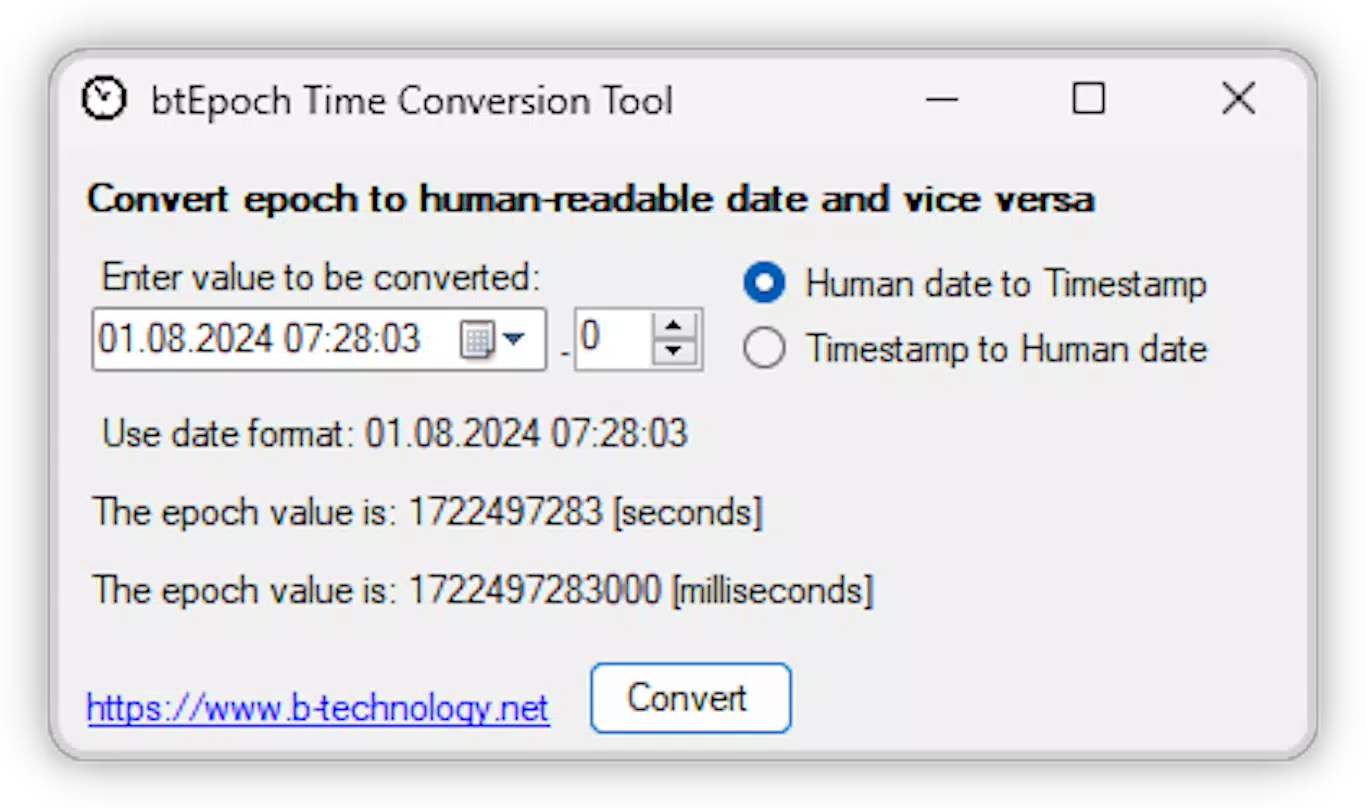
The user interface of btEpoch Time Conversion is designed with functionality and clarity in mind, focusing on minimalism and efficiency. The layout centers around two primary input fields—one for standard date/time entry and another for Epoch values—accompanied by clear conversion buttons. Navigation is straightforward, with intuitive labeling and immediate feedback upon conversion, reducing the learning curve for new users.
Visual style is clean and utilitarian, prioritizing readability over decorative elements. Text fields are well-spaced, and the interface adapts to different screen sizes within the Windows environment. Although the developer did not list formal performance metrics, the app responds quickly to input changes, suggesting efficient processing and low resource consumption. The application remains stable during repeated conversions, indicating solid code structure and memory management.
Performance across device categories is not formally documented. However, given its lightweight nature and dependency on a widely supported .NET Framework, it is expected to function reliably on both desktop and laptop systems running modern Windows versions. Responsiveness is consistent, with no noticeable lag during typical usage. Stability is maintained through the use of a mature runtime environment, minimizing crashes or unexpected behavior.
Platform Compatibility & Technical Requirements
btEpoch Time Conversion is designed for the Windows platform and requires .NET Framework 4.8.1 to operate. The application has a file size of 3.2 MB, making it compact and quick to install. The software version is 1.0.0, and it was released on August 29, 2024.
The developer did not specify minimum OS requirements or compatibility details beyond the .NET Framework dependency. Therefore, it is recommended to ensure that the target system has .NET Framework 4.8.1 installed. Compatibility with older Windows versions or alternative operating systems such as macOS or Linux was not disclosed. Users should verify their environment before installation.
Pros and Cons
- Free to use with no restrictions
- Simple, focused interface ideal for quick conversions
- Accurate and reliable for both forward and reverse time conversions
- Lightweight and fast, with minimal system impact
- Runs on modern Windows systems with standard .NET Framework
- Only available for Windows, limiting cross-platform access
- No mobile or web version currently available
- Requires .NET Framework 4.8.1, which may need installation on older systems
- Developer did not provide detailed documentation or update history
- Not available on major app stores like Microsoft Store or third-party platforms
FAQ
Is btEpoch Time Conversion free to download and use?
Yes, the application is completely free to download and use. There are no subscription fees, in-app purchases, or trial limitations.
Can I use btEpoch Time Conversion on Windows 10 or Windows 11?
Yes, the app is compatible with modern Windows environments that support .NET Framework 4.8.1. This includes Windows 10 and Windows 11.
Do I need to install .NET Framework to run this app?
Yes, the application requires .NET Framework 4.8.1 to function. If it is not already installed on your system, you will need to install it before using the app.
Is there a mobile version of btEpoch Time Conversion?
Currently, there is no mobile version available. The app is designed exclusively for Windows desktop systems.
How secure is btEpoch Time Conversion?
As a freeware tool that runs locally on your system, btEpoch Time Conversion does not transmit data externally. It processes conversions offline, ensuring user data remains private and secure.
Final Thoughts
btEpoch Time Conversion delivers a focused, efficient solution for developers and system administrators who need accurate time conversions on Windows. Its ability to convert between standard date/time and Epoch formats with ease makes it a valuable addition to any technical workflow. While it lacks mobile support and platform diversity, its simplicity, reliability, and zero cost make it a standout choice for users working in Windows-based development environments.
For those who frequently handle timestamps in code, APIs, or logs, this tool eliminates the need for scripting or external utilities. Its minimal footprint and straightforward interface ensure that time conversion becomes a seamless part of daily operations.
Download btEpoch Time Conversion now and streamline your time data workflows with confidence.


